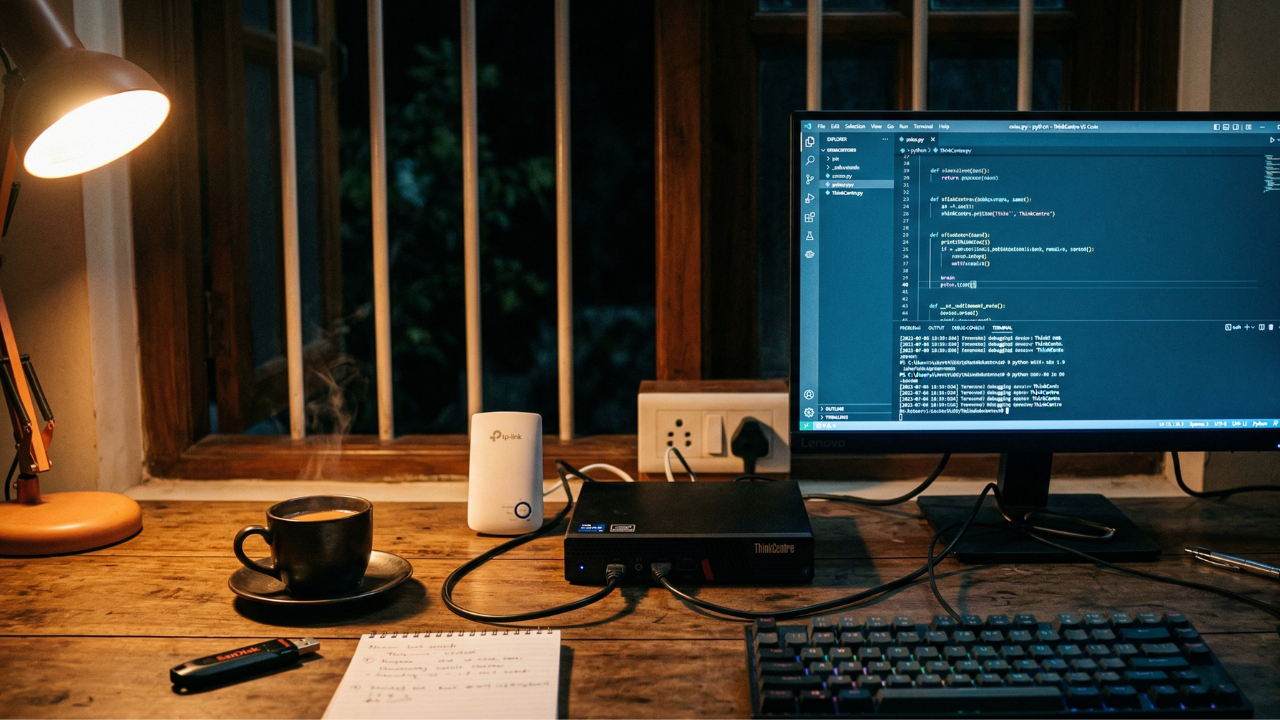

It was past midnight. My automation pipeline had just crashed. Again. I’d been watching it fail for days — same pattern, same timing, always when the network got serious. And I finally had the diagnosis. The TP-Link WiFi extender on my second floor, the one my homelab was connected to via ethernet cable, had a 100Mbps LAN port. That was the ceiling. And Kubernetes, with everything I was running on it, was hitting that ceiling hard enough to take the whole server down.
I made a decision in about thirty seconds. Scrap it. All of it. Tonight.
Then I reached for a pen drive and discovered that every single one in the house was dead. Unused long enough that none of them would boot, none would register on Balena Etcher, none were going to help me install Ubuntu at 12:30am. So I did what anyone in Kerala in 2026 would do: I opened Swiggy, searched “pen drive”, found a 64GB flash drive available for delivery, and placed the order.
The migration could not begin until the pen drive arrived. I waited. This is homelab life.
But the story doesn’t start there. It starts weeks earlier, with a tab open to a refurbished PC store, and a question I wasn’t sure I could answer: can I actually trust this?
Chapter 1 — Finding the machine
Like a lot of people in tech, I’d been following the homelab rabbit hole for a while. Everyone seemed to be building their own setup, running their own Kubernetes cluster, self-hosting their own services. I wanted in. Not because I needed to prove something, but because there’s a particular kind of learning that only comes from owning the hardware — from being the one responsible when the disk fills up, when the node goes down, when the network drops at 2am and there’s no team to call.
The goals were clear: self-host applications I actually use — Jellyfin, Nextcloud — and give a proper home to a side project called ytflow, a YouTube automation pipeline I’d been building. It had distinct CLI stages: idea collection via the Claude API, asset gathering, FFmpeg-based video rendering, and YouTube upload. A real project that deserved real infrastructure.
The hunt led me to Bharathi Systems, an online store that’s been selling refurbished computers since 2005. They carry everything — ThinkCentres, EliteDesks, OptiPlexes — all tested, warranted, and shipped across India. I found a listing that caught my eye: the Lenovo ThinkCentre M70q Tiny, 10th Gen i5, configurable up to 64GB RAM, in a form factor roughly the size of a hardcover book.
But I’d never bought refurbished hardware online before, and the doubts were real. Is this vendor legitimate? What if the machine arrives dead? I spent more time than I’ll admit researching — looking for reviews, complaints, return horror stories, anything. What I found was reassuring: established reputation, genuine customer service, a 15-day return window, warranty options up to a year. Still, I kept second-guessing.
After going back and forth across nearly a dozen options from their catalog, it came down to two: the Lenovo ThinkCentre M70q Tiny and the HP EliteDesk 800 G6 Mini. Same processor, same RAM configuration, within ₹600 of each other. The HP was tagged “Unboxed” — meaning it had been returned before — and had a 7-day return window on the 1-year warranty config versus Lenovo’s 15 days. The Lenovo won. Not by much. But it won.
Then came the WhatsApp negotiation. Before placing the order, I messaged Bharathi Systems directly: what brand of NVMe SSD would actually ship, what the warranty really covered, whether built-in WiFi + Bluetooth was possible. Their responses were honest in the way that good vendors are. The SSD would be EVM or Aarvex depending on stock. Warranty covered everything except physical damage and burning. RAM would be Samsung or SK Hynix. Built-in WiFi was doable with an internal card for an extra ₹2,000.
Samsung or SK Hynix RAM. That was genuinely better than expected for a refurbished machine at this price.
The final configuration:
| Component | Spec |
|---|---|
| Processor | Intel Core i5-10500T |
| Memory | 32GB DDR4 (Samsung / SK Hynix) |
| Storage | 512GB Aarvex NVMe (brand new) |
| Video encoding | Intel Quick Sync / VAAPI |
| Network | Built-in WiFi + Bluetooth |
| Warranty | 1 Year |
| Form factor | Tiny PC — ~1 litre |
| Vendor | Bharathi Systems, est. 2005 |
The machine arrived. It worked. The vendor was completely legit. All that anxiety — weeks of it — resolved the moment it booted.
One note for anyone considering this in Kerala: the i5-10500T has a 35W TDP, which means it draws very little power for a 24/7 machine. Running continuously, you’re looking at roughly ₹350–500 added to your monthly electricity bill. The Intel Quick Sync hardware encoder was also a deliberate choice — ytflow renders vertical format videos via FFmpeg with VAAPI acceleration, and the i5-10500T handles that natively without any external GPU.
Chapter 2 — Going deep on Kubernetes
Once the machine was up, I went ambitious. Kubernetes was everywhere — everyone in the homelab community was running it, writing about it, building around it. I wanted to understand it properly, not from a managed cloud console but from the ground up. Build it from bare metal. Break it. Fix it. Learn the hard way.
I set up Proxmox VE as the hypervisor and carved out three VMs. The naming followed a convention I’d settled on: biblical names. The control plane became Gospel. The worker nodes: John1 and John2. I used kubeadm to bootstrap the cluster on Kubernetes v1.35.2. And then I kept stacking.
The full stack at peak ambition:
| Layer | Component |
|---|---|
| Hypervisor | Proxmox VE |
| Cluster | kubeadm K8s v1.35.2 |
| CNI | Cilium v1.19.1 (with L2 announcements) |
| Storage | Longhorn v1.11.1 |
| Database operator | CNPG v1.28.1 |
| Database | PostgreSQL 18 + pgvector |
There’s a specific kind of satisfaction that comes from getting all of that running inside a machine that fits in a laptop bag. I felt it. And along the way I learned things that documentation simply doesn’t hand you.
When you clone VMs in Proxmox for K8s worker nodes, you have to manually reset the hostname, static IP, machine-id, and kubeadm join state on every single clone — otherwise nodes collide on the network and the cluster never comes up cleanly. Cilium’s L2 announcements require an explicit flag at install time: l2announcements.enabled=true. Miss it and you’re doing a full reinstall — there’s no patching it later. Longhorn’s disk expansion follows a rigid sequence: pvresize → lvextend → resize2fs. Cloned VMs may also need partprobe and growpart before LVM commands even register the new disk size.
Proxmox doesn’t ship with standard networking tools. No
nmcli, noiwconfig, nowpa_supplicant. You find this out at the worst possible moment. You install them manually, or you suffer.
These are the lessons you only earn by running the thing yourself, on hardware you own, at 11pm when something breaks and there’s no one to call. That was the whole point. And for a while, it worked.
Chapter 3 — What the TP-Link was hiding
The setup was like this: the Jio fiber router was downstairs. The homelab — the ThinkCentre — was on the second floor in the office space. The server connected via ethernet cable to a TP-Link WiFi extender. The extender connected to the rest of the network wirelessly. It seemed fine. It was not fine.
The TP-Link’s LAN port maxed out at 100Mbps. That was the hard ceiling on everything passing between the server and the network. Under light load, completely invisible. But Longhorn isn’t a light load — it’s distributed block storage that continuously replicates data across nodes. And when ytflow’s automation stages kicked in alongside that replication traffic, the 100Mbps pipe would fill up entirely.
The logs told the story clearly:
e1000e nic0: NETDEV WATCHDOG: CPU: 3: transmit queue 0 timed out 5062 ms
e1000e nic0: Reset adapter unexpectedly
The Intel NIC’s transmit queue was timing out. The adapter was resetting itself. Then came the link flaps — the NIC dropping and recovering within seconds, repeatedly:
NIC Link is Down
NIC Link is Up, 100 Mbps Full Duplex
100Mbps. When it should have been 1Gbps. The extender’s LAN port was negotiating the connection down, and the NIC was running at a fraction of its capability. Under sustained replication load, it would fall over entirely — hard crash, no clean shutdown, no warning. Just a kernel that stopped responding and a machine that needed a physical restart.
It wasn’t a Kubernetes bug. It wasn’t a misconfiguration. It was physics. A 100Mbps bottleneck between the server and the network, and a workload that needed more.
The real fix would have been running ethernet directly from the ThinkCentre to the Jio router, bypassing the extender entirely. That wasn’t possible that night. And continuing to patch around a fundamental hardware bottleneck felt like exactly the wrong lesson to carry forward.
Chapter 4 — Midnight. The decision. Swiggy.
Around midnight I made the call. Scrap Kubernetes. Scrap Proxmox. Reinstall Ubuntu Server from scratch and move to Docker Compose.
It wasn’t just about the crash. The crash was the moment of clarity. Kubernetes is genuinely fascinating — the homelab community is building incredible things with it and there’s a lot worth learning. But after a month of running it on a single node, through a bottlenecked extender, for a project that ultimately needed a stable database and a reliable task scheduler — the complexity was getting in the way of the application. ytflow deserved stability. Docker Compose would give that. Kubernetes could wait for proper hardware, a proper wired connection, a proper dedicated setup.
I reached for a pen drive to flash the Ubuntu ISO. Every one was dead. Months of sitting unused had been enough. Balena Etcher couldn’t see any of them.
~12:30 AM. Open Swiggy. Search “USB drive”. Find a 64GB flash drive available for delivery. Place order. Confirm. Wait. Make tea. Think about the fact that a ₹1,500 WiFi extender had just ended a month of Kubernetes work. There is a lesson in there about foundations.
The pen drive arrived. Ubuntu Server 24.04 LTS ISO flashed. ThinkCentre booted from it. And immediately: the first surprise.
The installer couldn’t partition the NVMe drive. Proxmox had left behind an old pve LVM volume group that Ubuntu flat-out refused to work around. You have to drop to a shell and manually run lvremove, vgremove, pvremove, and wipefs before the installer will cooperate. This is not in any documentation. It lives in a forum post from three years ago that you find at 1:30am.
By 3am, Ubuntu was installed. The migration was done.
Chapter 5 — The new setup, and what it’s actually for
The server now runs Ubuntu Server 24.04 LTS on the same ThinkCentre hardware. Hostname: gospel — the naming survived. Static IP at 192.168.29.200 on ethernet (metric 100), WiFi on wlo1 as a fallback (metric 200). Tailscale for secure remote access. Docker Compose for everything else.
This was a deliberate trade-off, not a retreat. Kubernetes on a single node, connected through a bottlenecked WiFi extender, was teaching me its own lessons — but not the right ones for where things are right now. The right place to go deeper on Kubernetes is with proper multi-node hardware, a proper wired network, and a workload that genuinely demands it. That day will come. For now, the homelab’s job is to run ytflow reliably.
The roadmap from here: restore the ytflow PostgreSQL database — backed up via Tailscale SSH before the migration, so nothing was lost — containerise the pipeline with Docker Compose, then add Jellyfin and Nextcloud once the base is stable. A self-hosted GitHub Actions runner is on the list too. And further down the line, when there’s more hardware and a proper wired setup: Kubernetes again. With more nodes, more patience, and a gigabit switch instead of a wall-socket extender.
Honest lessons from one month of this
01 — The bottleneck is always in the place you’re not looking. A 100Mbps LAN port on a WiFi extender isn’t a problem until your storage layer needs more than 100Mbps. Then it’s the only problem. Wired ethernet directly to the router is not optional for anything running replication traffic.
02 — Buying refurbished hardware online in India is less scary than it looks. Thirty minutes of due diligence — check reviews, message the vendor directly, ask specific questions before paying — tells you quickly whether a seller is legitimate. Bharathi Systems delivered exactly what they promised, and the machine has been solid.
03 — Kubernetes is worth learning. It’s also genuinely overkill for a single-node homelab. Running the full stack — Longhorn, Cilium, CNPG, the works — is an incredible way to learn how these pieces fit together. But it’s a lot of operational overhead for a personal project that just needs a database and a scheduler. Know what you’re optimising for.
04 — Proxmox leaves a mess when you reinstall over it.
The pve LVM volume group does not clean itself up. Drop to a shell before starting the Ubuntu installer. This will save you an hour of confused troubleshooting at 1am.
05 — The application is the point, not the infrastructure. The homelab exists to serve the project. When the infrastructure starts crashing the application, the infrastructure is wrong — regardless of how interesting it is to run.
06 — Always have a working pen drive. Or at minimum, know which food delivery apps in your city carry flash drives at midnight. In Kozhikode, the answer is Swiggy.
The homelab isn’t finished — it never is. But it’s stable, purposeful, and running. Somewhere in a drawer is a 64GB pen drive that arrived at 1am on a Swiggy delivery, which is probably the most Kerala infrastructure story there is. The ThinkCentre is still running. The TP-Link is still on the second floor. One day there’ll be a proper cable running directly to the router, more nodes, and a Kubernetes cluster that doesn’t flinch. Until then — we adapt.